Everyone clicked submit. Who actually understood?
Quizzes that tell you which topic the room missed
Paste your questions or upload slides as a PDF. Run it live or send a link; people answer on their own phone, no app. Get an Excel report by topic, then re-quiz to see what changed.
Free: 1 live session a week, up to 120 people · No card, no account to start · See plans
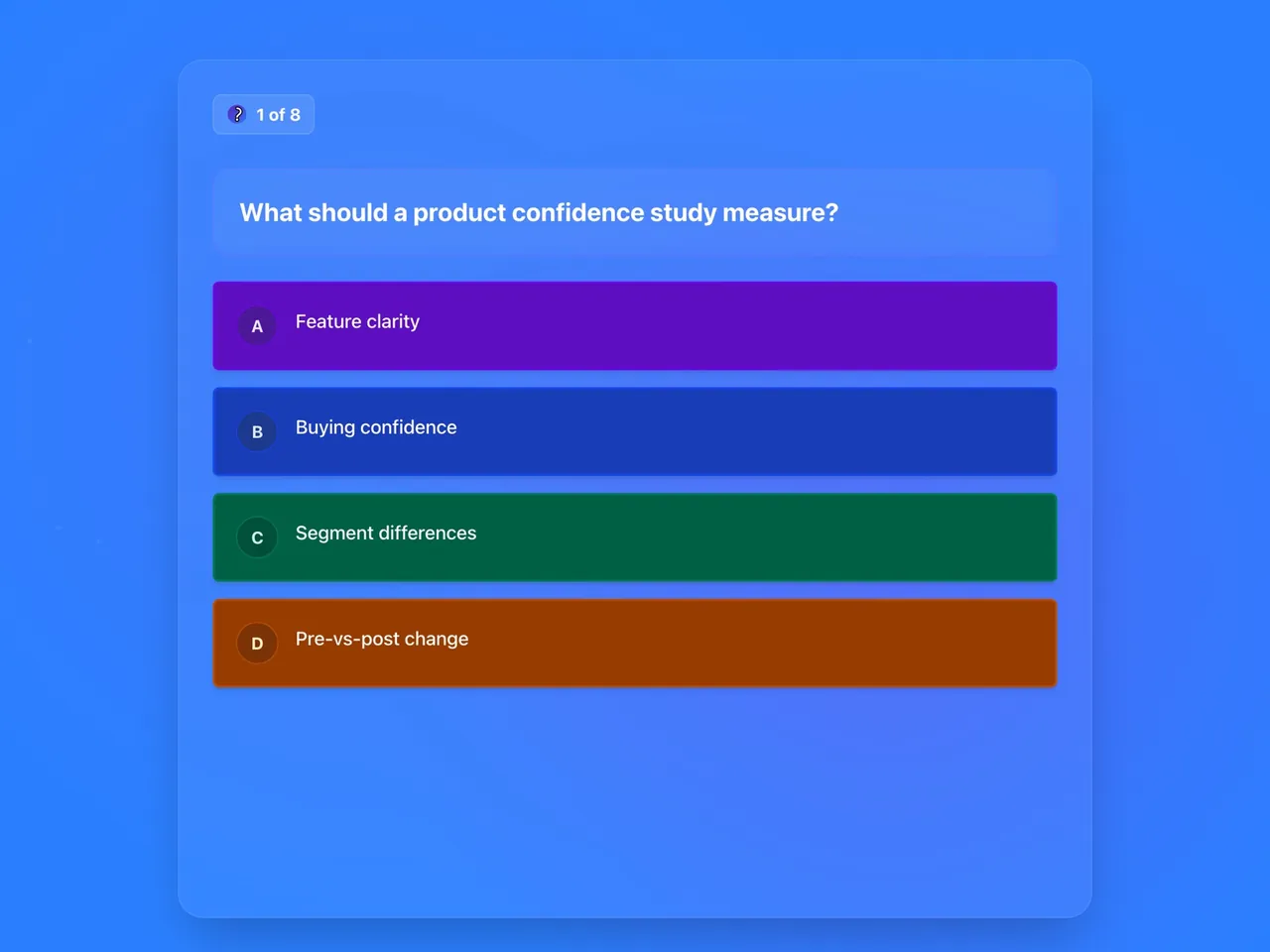
or click through a sample session first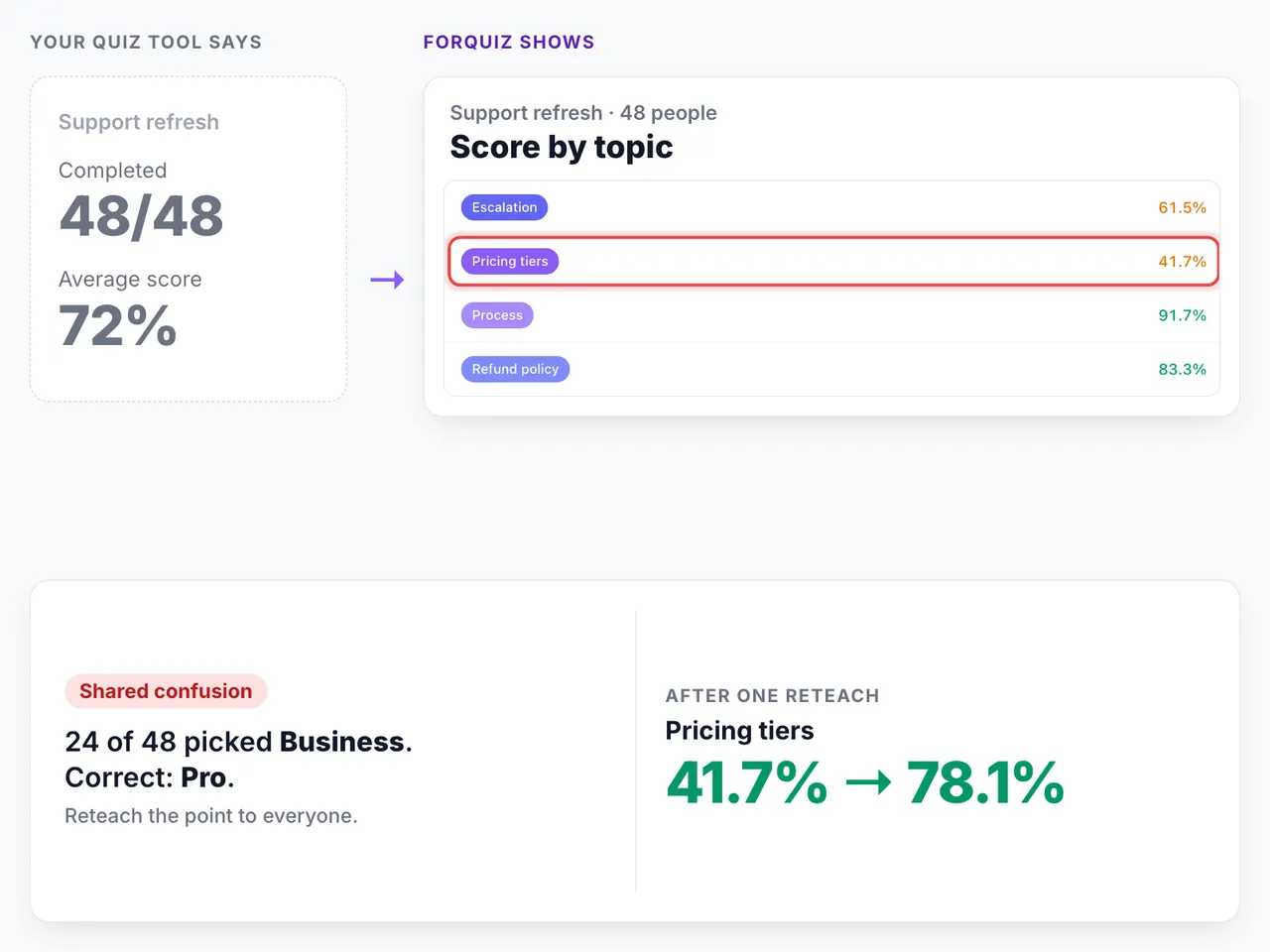
Run live at
- AWS User Group Mumbai
- Dear Azure Mumbai
- VSIT Mumbai
- Mulund College of Commerce
- Hinduja College
- LLRC
Over 700 players across meetups and college classrooms, with up to 366 in one room.
You've probably been here
The number you gave your manager was a completion rate, and both of you know that isn't the same as understanding. A report you can't vouch for is worse than none, because somebody will make a decision on it.
You lost an evening retyping questions out of a slide deck, one option at a time.
You spotted a typo in question eleven after the link went out. Fixing it meant a new link, or living with it.
A slow phone or patchy Wi-Fi cost someone points, and the report can't tell that apart from not knowing the answer.
You ran the same check after the last rollout, and there's no way to put the two results next to each other.
How a round goes
Setup takes about as long as pasting your questions in.
- 1
Bring what you already have
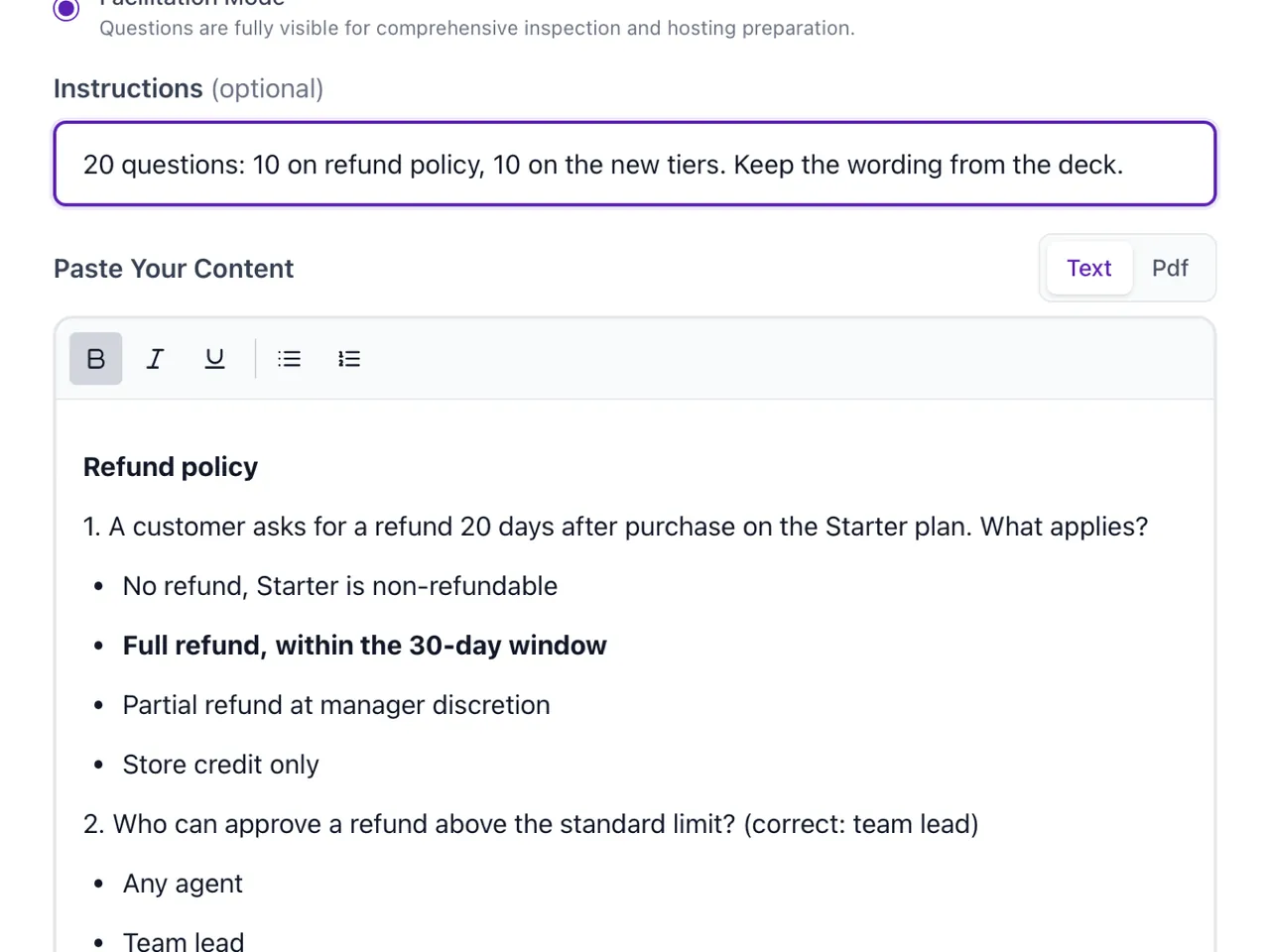
Paste the questions you wrote, or upload the PDF and pick the pages. Say what you want from it: twenty questions, ten on refund policy, ten on the new tiers. Every question comes back tagged by topic.
- 2
Run it live, or send it out
Live, everyone answers together while you set the pace. Sent out, people take it within a window you choose. Either way they open a link, no app. Live, they just type a name; for a self-paced check you choose email, phone or employee ID.
- 3
Read the report, then run it again
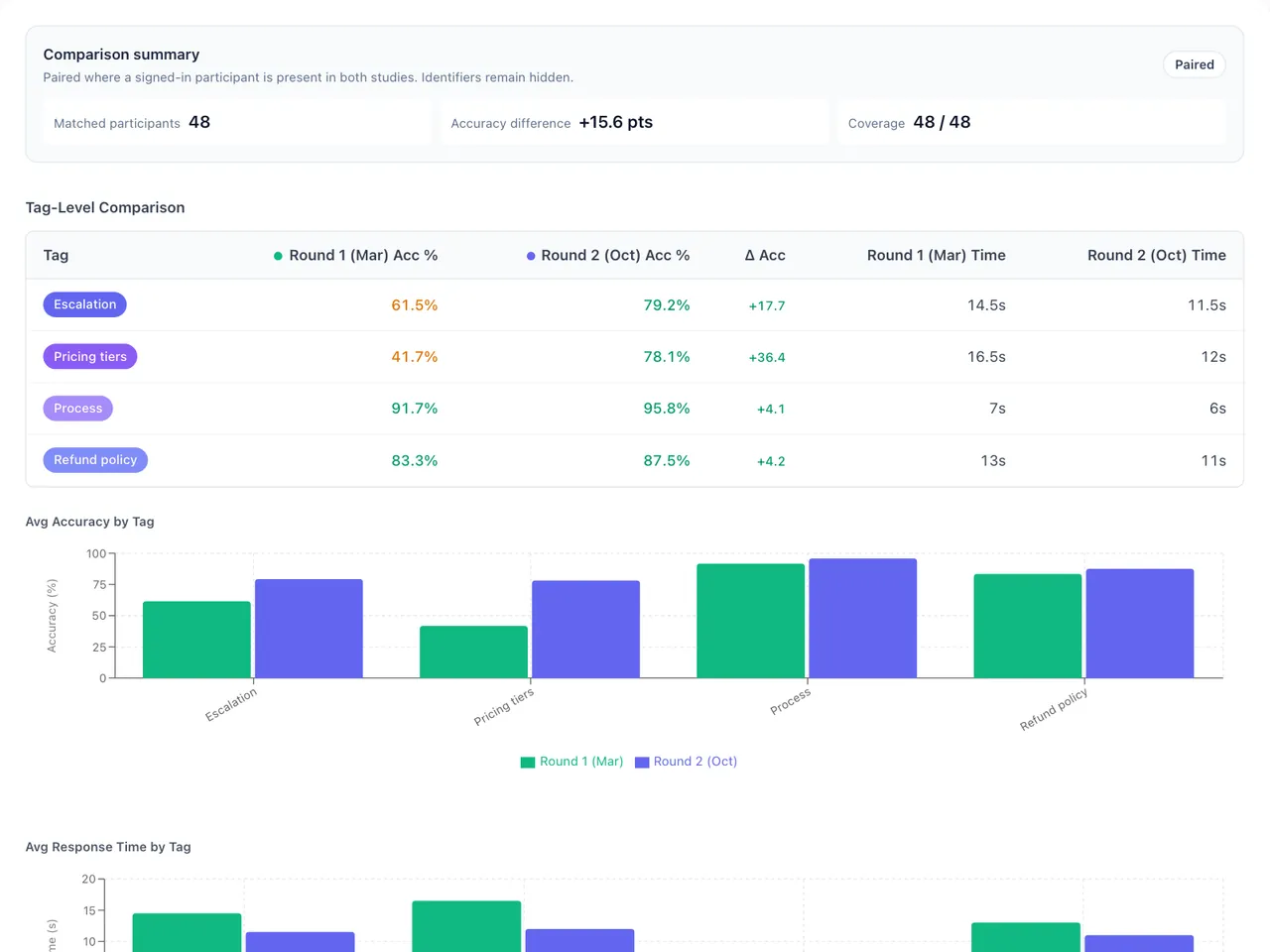
Drill into one person, or put Marketing-North next to Sales-South. After the next round of training, point at this quiz as the reference and you get fresh questions on the same topics, none repeated, so the two rounds line up.
Where it differs
Nobody's score depends on their phone
Every question has a countdown, but your time is measured on your own phone: from the moment the question shows up on your screen to the moment you tap. A slow connection that delays the question by two seconds doesn't cost you those two seconds. If a phone dies or someone refreshes, they carry on from where they were.
“Old mobile. Every other app hung. ForQuiz worked seamlessly.”
Your questions arrive as you wrote them
Elsewhere, "import" means reformatting your file to match theirs. Here you paste the quiz however you wrote it, or hand over the PDF and a page range. Bold, the word "correct", a note saying the first option is right: the answers get picked up as you marked them, and any that look wrong are flagged for a second look.
“Now I don't have to copy-paste each question and option and mark the correct answer.”
The report says which topic, and what changed
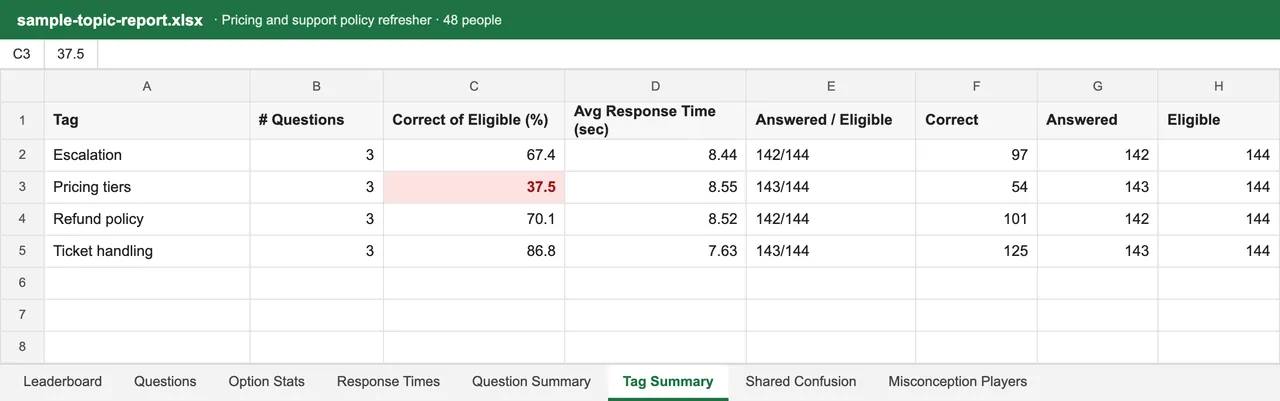
One average tells you nothing you can act on. Because every question carries a topic, the report says the room is fine on process and shaky on pricing. Run a second round and you see which topics moved and which people moved; only topics both rounds share get compared.
Every report is labelled with what it is and when it was taken, and comes out as Excel. A report from March means the same thing in October, even after a reorg.
“The Excel report of the live session. This is exactly what I wanted.”
Reteach the room, or talk to two people?
The report also shows how people got it wrong, so you know which fix to use.
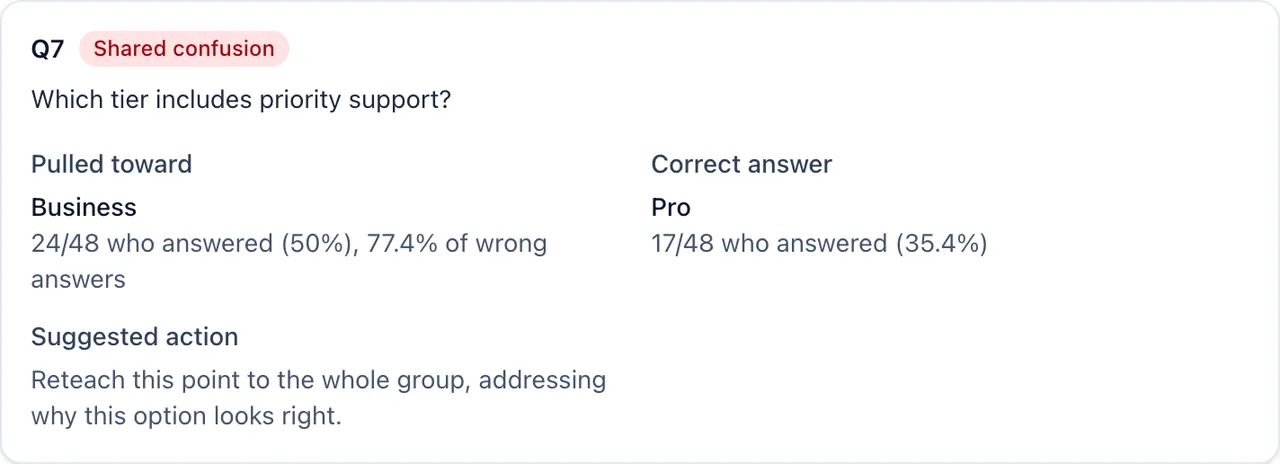
Half the room picked the same wrong answer
Reteach that point to everyone.
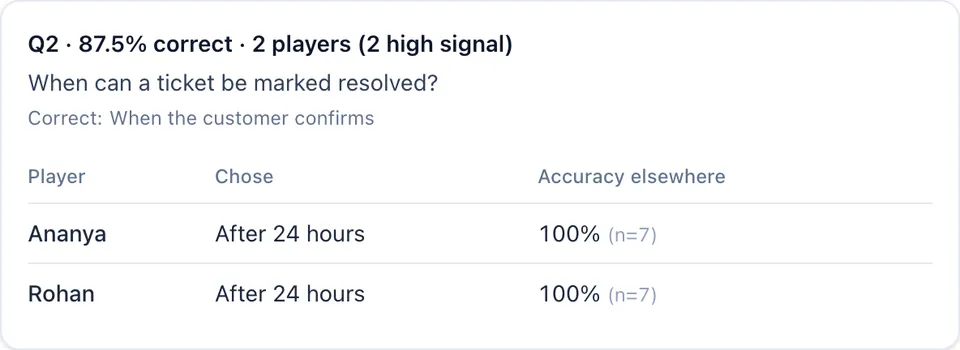
A few strong people missed an easy one
A quick word with them is enough.
Two ways to run it
Everyone together, live
You set the pace. Quick answerers get a "did you know" while the rest finish, then everyone sees how the room answered. At the end the winners are revealed one place at a time, from the bottom up.
“Students were at the edge of their seats.”
On their own time
Set a window and pick who gets in: a department, a region, or a list you keep in Excel, by email, phone or employee ID. Fix a question midway and the link still works; nobody is marked down for a question they never saw.
Participants live in a directory: one email, phone and employee ID each, in segments like Department: Sales. Move someone later and last quarter's results stay put.
Both can run against the clock or without one. Without a clock nobody sees a timer, but you still get how long each answer took. There's also single-player, for practice.
Rolling this out to a big team? .
Your data
- Hosted in Mumbai
- Quizzes, sessions and reports are stored in the ap-south-1 (Mumbai) region, and everything travels over HTTPS.
- Reports stay with you
- Excel reports sit in private storage. Only the person who ran the quiz can download them.
- Only what you ask for
- Live, people just type a name. For a self-paced check you pick the identifier: phone or employee ID with no account, or email, where they sign in so nobody can answer as someone else.
- Nothing sold
- We don't sell personal data. Usage analytics only load if a visitor accepts them; we keep error logs to fix problems. The AI that writes questions gets your quiz material, not participant data or results.
Details, including which AI providers we use and what they keep, are in the privacy policy.
Questions
- Can people see how they did?
- Up to you: straight away, or once the window closes. The score, or just right and wrong per question. They can share their result card as an image.
- Can I put formulas in questions?
- Yes. LaTeX renders in questions, options and the "did you know" notes.
- Can I host from my phone?
- Yes, and you can switch midway. Start on a phone, pick it up on a laptop from active live sessions. The room stays on the same question.
- Can I compare a live session with a self-paced one?
- Yes. Both are read the same way, so a live kickoff in March and a self-paced check in June sit side by side: topic by topic, and person by person for anyone who took both.
- Where is the data stored, and who can see results?
- In the ap-south-1 (Mumbai) region. Results and Excel reports are private to the person who ran the quiz. Participants can ask for their answers to be deleted, and we handle requests within 30 days.
- What does the free plan include?
- 1 live session a week for up to 120 people, 1 self-paced check a week for up to 200, and 1 AI-generated quiz a week. No card needed.
Try it on your next session
Paste the questions you already have, run it live or send a link, and read the topic report at the end. Not ready yet? Click through a sample session first, with no account and no email.
Free: 1 live session a week, up to 120 people · No card, no account to start · See plans
or click through a sample session first